JupyterLab
JupyterLab is a web-based platform with an integrated IDE, optimized for data science, scientific computing and machine learning with Python. It enables users to work with Jupyter notebooks, terminals and output visualizations within a single customizable workspace. For usage information see the official Jupyter documentation.
Launching JupyterLab
Using Magellano OnDemand: from the Interactive Apps menu, click on JupyterLab.
Fill the form with the required job options and click Launch.
When your job is up and running, click on the Launch JuyterLab in the My Interactive Sessions page.
You will be redirected to the Jupyter web interface.
Loading Your Virtual Environment
Jupyter will run in a default minimal Python environment. To run your notebooks, you will likely need to install dependencies and make them available in your Jupyter environment. To do this, you need to create an IPyhton kernel.
First, create a Python virtual environment (for example, my_environment) as explained in
Python Virtual Environments.
Then, activate the environment and install the ipykernel package:
source $VENV_ROOT/bin/activate
pip install ipykernel
Finally, install the kernel in your Jupyter environment:
python -m ipykernel install --user --name my_environment
You will find the new kernel in you JupyterLab launcher:
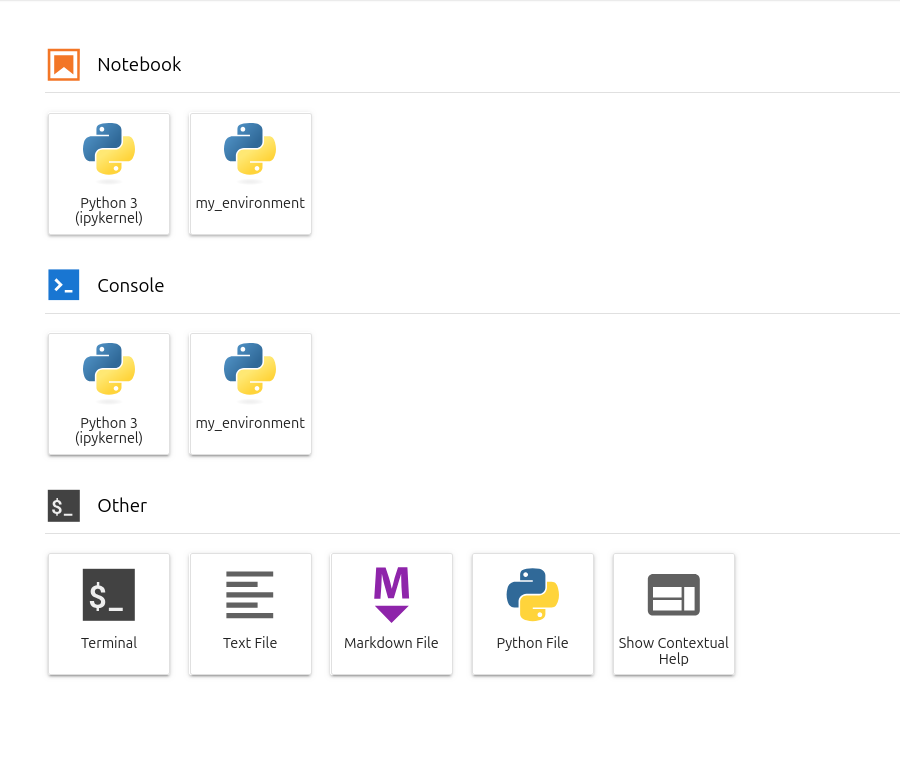
If you have multiple Python virtual environments that you need to include in Jupyter, you must repeat the kernel installation procedure for each of them.
You can remove a kernel as follows:
jupyter kernelspec uninstall <kernel_name>
Learn more about IPython kernels in the official documentation.